 Skip to content

Quick Answer
If Samsung TV will not pair with iPhone, put the iPhone and TV on the same trusted Wi-Fi network, allow Local Network permission, keep the TV awake, check Samsung Device Connection Manager access settings, and approve the PIN or TV prompt when it appears.
Last updated: May 7, 2026.
Symptoms and Fixes
| Symptom | What to Check |
|---|---|
| Samsung TV does not appear | Same Wi-Fi network, Local Network permission, TV awake, no guest network |
| PIN never appears | Restart the TV, open the Samsung setup guide, and retry pairing from the app |
| PIN appears but pairing fails | Enter the current PIN, not an old one, and confirm the TV prompt before it expires |
| TV rejects the app | Check Device Connection Manager or External Device Manager access settings |
| Pairing works once then fails | Restart the TV and router, then remove and add the saved TV again |
Step-by-Step Fix
- Connect the iPhone or iPad and Samsung TV to the same trusted Wi-Fi network.
- Open iPhone or iPad Settings and allow Local Network access for Remote Control for TV.
- Turn the Samsung TV on and keep it awake during pairing.
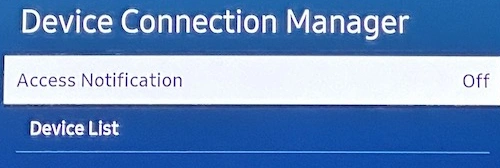
- On supported Samsung TVs, check Device Connection Manager or External Device Manager and allow mobile device connections.
- Open Remote Control for TV, select the Samsung TV, and enter the PIN or approve the prompt shown on the TV.
- If pairing still fails, restart the TV, router, and iPhone, then retry from the Samsung setup guide.
Works With / Does Not Work With
| Works With | Does Not Work With |
|---|---|
| Supported Samsung Smart TVs on the same local network | Different, guest, hotel, school, or isolated networks |
| TV approval prompts and current PIN codes | Expired PIN codes or missed TV prompts |
| Samsung access settings that allow mobile device control | TV settings that reject or block new remote devices |
Samsung Pairing FAQ
Should I delete and reinstall the app?
Usually no. Pairing failures are most often caused by network isolation, permission, TV access settings, or a missed TV prompt.
Can the app pair if the TV is off?
Initial pairing is more reliable when the TV is on and awake. Wake behavior after pairing depends on Samsung model, firmware, and standby settings.
Where can I add missing Samsung apps?
Use the Samsung custom app IDs page after the TV is paired.
Common questions
Why will my Samsung TV not pair with iPhone?
The most common causes are different Wi-Fi networks, blocked Local Network permission, Samsung access settings, a missed TV approval prompt, guest network isolation, or a sleeping TV.
Where is the Samsung Access Notification setting?
On supported Samsung TVs, check Device Connection Manager or External Device Manager settings. Menu names can vary by model and firmware.
Does Samsung TV pairing require internet?
Pairing is local network control. Internet is not normally required for local remote control, but streaming apps and TV services may need internet.